The decision that shaped it
Marks on the content, not a report
The surrounding words matter. An underline points at a claim, and the reviewer still has the sentence and its context to decide whether the flag is fair.
Margin’s sample passage · preset findings
Built-in checksOur city should build more bike lanes. Cycling is cheaper than driving, it is healthier, and it takes up less road space per person.
Some people might perhaps argue that bike lanes could possibly slow traffic, in a sense. In order to be in a position to address this concern it is necessary to look at what has actually happened in cities that built them. Traffic did not get worse. Traffic stayed the same or improved.
Basically the data is clear: bike lanes work. Bike lanes are effective. They deliver results. Let’s leverage this opportunity to drive alignment on a forward-looking mobility paradigm.
Tap a mark in the passage or a note in the margin to open its check.
The passage is one of Margin’s bundled samples. Marks, colours and check descriptions come from the product; the findings and Jev preferences are preset, with no live model call.
Where it stands
- Live now
- A public beta anyone can use: a Chrome extension and a web app that share the same checks.
- Tested
- I review its findings against real production responses on Ask SEEK. The SEEK voice pack has tuning checks on 43 sentences and seven paragraphs, and the repo has automated tests.
- Not yet proven
- There’s no measured agreement rate with my own judgement, thresholds aren’t calibrated against live scoring yet, and I’m the only regular weekly user.
The problem
I built Margin for my own work on Ask SEEK. I wanted to check that data from tool calls was reaching the front end correctly, and to see what the AI actually said to a candidate in production.
When I review an AI response, the useful feedback is usually specific. It answered a different question. It sounded more certain than the evidence allowed. It asked three things when one would have been enough.
A general quality score hides that reason. A broad instruction like “be trustworthy” does too, because each reviewer reads it differently. So the review stays manual, and the notes live in someone’s head or a spreadsheet far from the response.
The full build breakdownThe opportunity · What I built · Key decisions · How it works · How I verified it · Results · What I’d change
The opportunity
Offline evaluation tells you how a model does across a test set. It doesn’t help much when you’re looking at one reply inside the product and want to say exactly what’s wrong with it.
Margin sits in that gap. What I notice while reviewing becomes a written rule, and the same rules can feed the criteria and examples given to an LLM judge. Jhey Tompkins’s Stet experiment, a real-time writing linter, sparked the idea. I wanted that immediacy outside the editor.
Margin started as a personal tool and is now in public beta. Anyone can use it. The next step I have in mind is making it easier for other people at SEEK to use it in their own reviews.
What I built
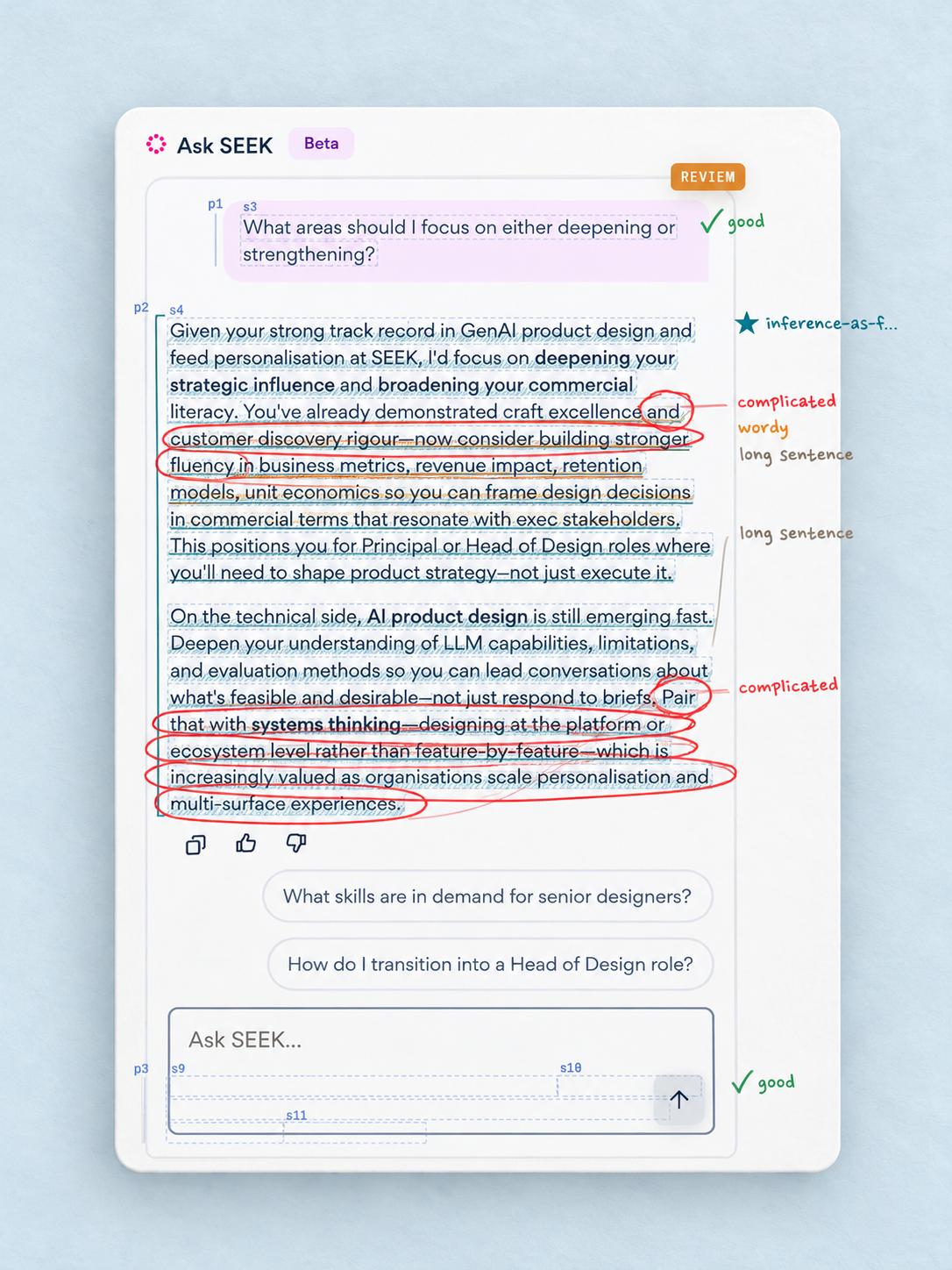
I built a Chrome extension and a web app that share the same checks, rule packs and finding cards. In the extension I hover to highlight part of a page, click to select it and use the arrow keys to widen or narrow the selection before running a check.
Each check draws its own mark: a wave for hedging, an underline for wordiness, a circle for a fancy word, a bracket for a paragraph that repeats itself. Opening a mark shows the check behind it, and I can ask for a preferred fix and apply it.
Key decisions
Review the page in place
The extension works on whichever page I’m already using. Nothing is copied into another tool first, so the response is reviewed as a user would see it.
One concern per rule, kept in Markdown
Rules live in readable packs with a name, a scope, a description and a route. When a finding looks wrong I can ask whether the response failed or the rule needs work.
Code counts, the model judges, code routes
Code measures what can be counted, such as repeated words. The model answers bounded questions. Code applies the thresholds and decides where each finding goes.
Give uncertainty somewhere to land
A result near a threshold goes to “learn” instead of passing quietly. The route is visible, so a borderline call gets looked at.
Authored teaching examples
Markdown rule pack## Build on something specific
scope: conversation
route: review
The reply follows up on a detail the storyteller
actually said, not a generic prompt.The reply follows up on a detail the storyteller actually shared, rather than using a generic prompt.
Nan says she made a blue dress. “What else would you like to talk about?”
Nan says she made a blue dress. “What did you like about making it?”
A paired example makes the criterion discussable. These are authored examples, not archived evaluation results.
How it works
When the selection is a conversation, the extension reads the layout of the chat bubbles to tell the person’s turns from the assistant’s. The visible transcript becomes the unit of judgement.
For each matching rule, Margin asks Jev, the model it uses as a judge, one narrow question, focused on the latest assistant reply with earlier turns kept as evidence. Jev returns typed answers. Code applies the rule’s threshold and route: auto-close, learn, review or priority review, with priority taking precedence. A localisation question can then point to the turn that caused it.
The explanation on a finding card is assembled from those answers, the criterion and the evidence. It isn’t a transcript of the model’s reasoning. Fixes work the same way: code proposes a few edits, and Jev ranks them against the rule and checks they keep the point.
Rule packs are imported as Markdown. The parser checks each rule’s fields and caps pack size and description length, and only the rule description reaches the judge.
Illustrative scores · fixed examples
Deterministic routeMove the threshold to see the local route change. Scores are illustrative, not accuracy or safety confidence.
Overall route
priority review
priority rule meets the threshold
priority reviewreviewlearnauto-closeUnapproved sharing action
priority rule · score 88
Unsupported certainty
review rule · score 72
Long reply
learning rule · score 57
Grounded, authorised reply
no review rule · score 18
The code selects the highest-priority matching route; a near-threshold priority or review result can go to learn.
How I verified it
I review Margin’s findings against real production responses. The SEEK voice pack also has documented tuning checks covering 43 sentences and seven paragraphs, including examples of what should pass and what should be flagged. The repo includes automated tests for the trust checks and the extension.
I don’t have a measured agreement rate between Margin’s findings and my own judgement, and the rule packs haven’t been calibrated against live Jev scoring, so I treat their thresholds as working values.
The model only sees the text it’s given. It can assess a visible claim that an action happened; it can’t establish what a hidden tool did. That limit shapes how I write rules: each needs examples of what should fire and what should pass, and I watch for false flags as closely as missed problems.
Illustrative findings
Finding evidenceConstructed exchange
Nan: “I made the dress myself, from scratch.”
Choose a finding to bring its passage into view.
Review · illustrative
Grounded follow-up
Criterion
Build on a detail the storyteller actually shared.
Evidence
The question returns to the dress, a detail in the exchange.
A relevant follow-up can still be reviewed for tone and timing.
Results
I’m the only regular weekly user. At SEEK we already use a model to evaluate responses on synthetic data. Margin lets me check what happens when the same prompt runs with real data and other tool calls in production.
When a response showed that a prompt change hadn’t worked as intended, I went back, revised the system prompt and checked the output again.
What I’d change
I’d build Margin directly into SEEK’s existing tools and put it behind a feature flag. That would let colleagues review an AI response in the same place they’re already seeing it in production.
I’d also calibrate each rule pack against representative examples before trusting its thresholds. A threshold is a decision about when a signal deserves attention, not proof the judgement is right.
Try it
Margin is in public beta. Open the app, or install the Chrome extension to review the pages you already use.
Open the Margin appmargin.rsimms.com