
A working definition
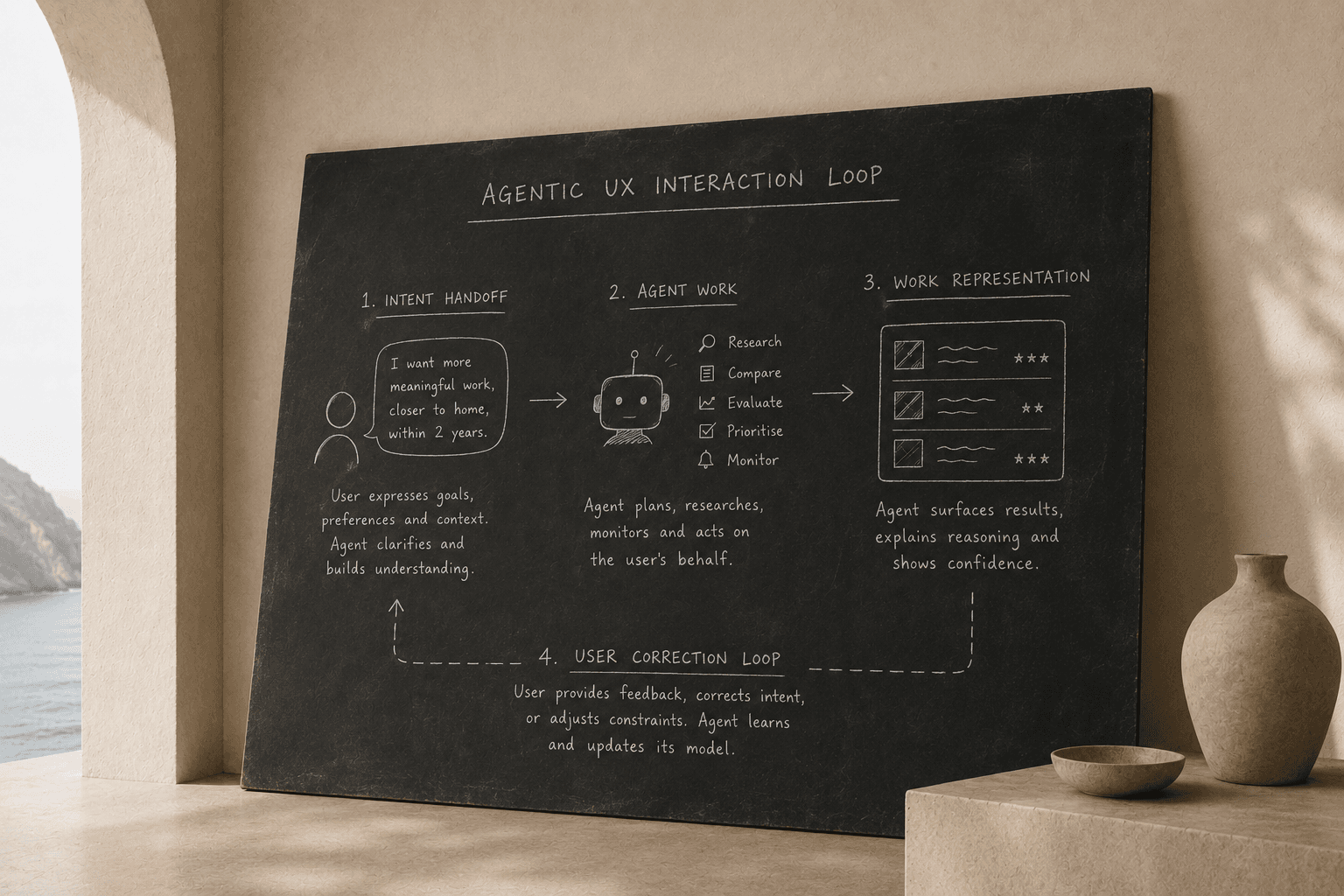
Agentic UX is the interaction layer between users and agents: how users hand off intent, and how agents represent themselves and their work back.
That two-part framing matters.
Most design work around "AI in products" is focused on the output side: how to display a recommendation, a summary, or a generated result. Agentic UX includes the input side too: the moment a user tries to communicate what they actually want, including the parts they cannot yet fully say.
Both sides are hard design problems. Neither is solved by choosing a chat interface.
In practice, those two sides form a loop rather than a one-way handoff:
Why this is a distinct discipline
Agentic UX is not the same as AI product design in general. It is not the same as conversational UX either.
AI product design covers any product that uses machine learning or generative AI. That includes ranked search results, personalised feeds, smart autocomplete and fraud detection. Much of this work is invisible to users. There may be no direct interaction layer to design, only an output to assess.
Conversational UX is an interface pattern: dialogue, voice or chat. An agent might use it, but it does not have to. A notification-driven agent, a feed-driven agent and a voice-driven agent can all be agentic. The modality is a choice. The underlying design problems of intent capture, delegation, and sense-making are the same.
Agentic UX is concerned with systems that act on behalf of users towards a goal. The agent has some room to plan, prioritise and execute, rather than just retrieve or display. That room to act is what makes the design problem distinct.
Three patterns worth naming
Agentic UX breaks into three interaction patterns. Most writing about the topic blends them together, but they need different design approaches.
1. Elicitation
Elicitation is the design of intent capture. What does the user actually want? Not just the keyword they typed, but the goal underneath it.
In traditional search, intent is inferred from a query. The user types "UX designer jobs Melbourne" and the system treats that as the full specification of their need.
Agentic systems can do more. They can ask follow-up questions, surface preferences the user had not named, and build a richer model of intent over time.
At SEEK, the difference was measurable. A conventional search session captured an average of 2.3 preference entities: role type, location, maybe seniority. The Career Discovery Agent's conversational elicitation surfaced 21.4 preference entities per session: soft constraints, career direction, negative preferences such as "not financial services", timing constraints and values that did not fit the old schema.
That is not a chat-versus-search argument. It is an elicitation argument. The agent surfaced what the user could not put into a query.
Designing for elicitation means building questions that earn context without feeling like a form, making intent editable after it is captured, and handling ambiguity without forcing false precision too early.
2. Delegation
Delegation is the design of ongoing agent work: what happens between sessions, or in the background while the user does other things.
The Career Discovery Agent watches new job postings against a candidate's full intent model and flags high-fit roles before the candidate returns. The candidate's visit to SEEK becomes a review of agent work, not a fresh search.
That is a basic shift in the product model: from reactive retrieval to proactive service.
Designing for delegation means making the handoff clear ("I'll keep watching for you"), showing activity history so users can see what the agent has been doing, and giving clear controls for scope and frequency. Users need to feel like they delegated a task, not like the system started acting without them knowing.
The hardest delegation design problem is calibration: how does the agent know when something is good enough to interrupt the user?
If it is too sensitive, it becomes noise. If it is too conservative, users wonder why they delegated at all.
3. Sense-making
Sense-making is the design of how users interpret what the agent returns.
This is where trust is made or lost.
An agentic result carries more meaning than a search result. When ranked search returns bad results, the user adjusts the query. When an agent that "understood your career goals" surfaces a bad match, users do not think "algorithm error". They think: "this system does not understand me."
The agent's output is read as a statement about its understanding of the user. That is a different frame from traditional results.
Designing for sense-making means explaining non-obvious matches in context, surfacing confidence without false certainty, making recalibration fast, and never implying the system knows more than it does.
For example: "surfaced because this matches your stated interest in career progression" is more useful than a vague "recommended for you". "Wrong level, update my preferences" is more useful than a generic dislike button.
In SEEK testing, lightweight reasoning labels shown at the point of relevance, rather than as a permanent UI layer, improved both engagement and reported trust.
Context beats disclaimers.
Two hard problems
Beyond the three patterns, agentic UX has two underlying design problems that are easy to miss.
Latency is a trust problem
In a traditional product, slowness is inconvenient. In an agentic product, slowness can feel threatening.
When search results take three seconds, users assume the system is processing. When an agent takes three seconds, users fill the silence with doubt.
Is it still running? Did it understand what I asked? Is something wrong?
The silence is the design problem.
An agentic system that takes time to do real work must communicate that it is working, not just show a spinner. Skeleton states, interim signals such as "reviewing your history…" or "comparing this to similar profiles…", and progressive disclosure of partial results all serve the same function: they turn wait time from doubt into evidence of effort.
This is not cosmetic polish. It is trust architecture.
The first surface is an identity signal
In traditional products, users form their view of the product through repeated use. A bad search result is a data point.
In agentic products, the first result is a statement.
When an agent that "understands your career goals" makes its first recommendation, users judge whether the system understands who they are. A poor first match does not read as a relevance failure. It reads as a comprehension failure.
The user's mental model of the agent's ability is set in that first interaction, and it is hard to repair from a bad start.
That means first-interaction design for agentic products deserves extra care. Not just in the quality of the output, but in how the system explains what it is doing with the intent it has been given, and how the user can correct it immediately.
What agentic UX is not
Two comparisons come up often and need to be separated.
Agentic UX is not personalisation. Personalisation changes what the user sees. Agentic UX changes what the product does. A personalised feed sorts and filters based on past behaviour. An agentic product can capture new intent, monitor on the user's behalf, explain its reasoning and act with consent. The interaction layer is different in kind.
Agentic UX is not chatbot UX. Chat is a modality. Agentic capability is a system property. A feed, inbox, planner or notification surface can all be agentic when the agent is doing work in the background and the interface is how the user reviews that work. The most important agentic interactions in a product may never involve a text input.
A practical starting point
If you are designing for agentic systems, start with three questions:
- Which pattern are you designing for: elicitation, delegation or sense-making?
- What room to act are you giving the agent, and what needs explicit user consent?
- How does the user correct the system when it is wrong, and how fast can they do it?
The broader principles will follow from those answers. But the patterns are the place to start. They tell you which design problems are actually in front of you.
About the author
Richard Simms is Principal Product Designer at SEEK, where he leads design for the Career Discovery Agent and Career Feed. He also builds Sentiuma, a personal AI knowledge infrastructure layer.