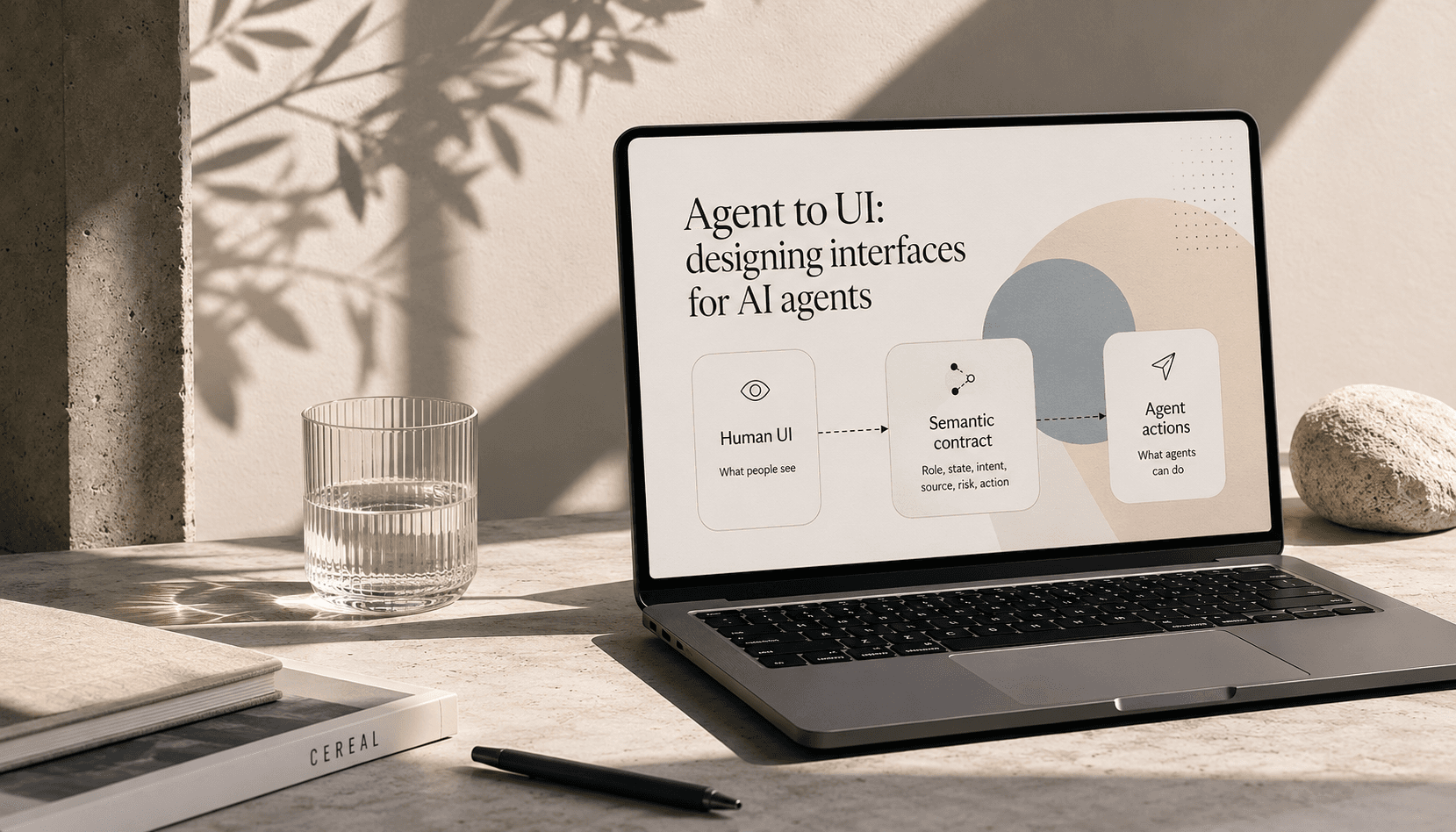
What is agent to UI?
Agent to UI is the interface contract between an AI agent and a product surface.
It describes how an agent reads, reasons about, composes, or acts on a user interface. It is not only about what the human sees. It is about what the agent can understand and safely do.
A human-facing interface asks:
Can a person understand this screen and take the right action?
An agent-facing interface also asks:
Can an AI agent understand the meaning, state, source, limits, and possible actions of this interface?
That second question changes the design work.
It means designers are no longer only shaping screens. They are shaping the contract between data, models, components, actions, and human trust.
Why this matters now
AI agents are starting to use software on behalf of people.
They read pages. They call APIs. They inspect tables. They compare options. They suggest actions. In some cases, they may soon act directly inside products.
But most interfaces were not built for this.
They were built for human attention, not machine reasoning.
An agent looking at a product surface may have to infer meaning from weak signals:
- text labels
- button copy
- page order
- DOM structure
- accessibility labels
- screenshots
- API responses
- design system component names
Some of those signals are useful. Some are fragile. Some are misleading.
A button that says “apply” might mean submit an application, start an application, open a modal, send data to a third party, or save progress. If an agent misreads that action, it might treat a high-trust user decision as a low-risk click.
A human can pause and judge the context.
An agent needs the contract.
The interface contract
An agent-facing interface contract should make the meaning of a surface clear.
At a minimum, it needs to expose:
- role: what this object is
- state: what condition it is in
- intent: what user or system goal it supports
- source: where the data came from
- confidence: how safe or certain the claim is
- permissions: what the agent can and cannot do
- risk: what could go wrong
- actions: what can happen next
- outcome: what result the action is meant to create
For example, a job card shown to a candidate is not just a card. To an agent, it may need to be understood as a recommendation unit with fit signals, ranking context, salary data, employer signals, application status, user preference match, and possible actions.
A human might see:
Product designer
Melbourne
Hybrid
Strong applicant
Apply
An agent needs to know:
Hover a field to see what it means for the agent
Each field in the interface contract tells the agent something a human infers visually — role, trust level, what actions are safe, and what risks to surface.
This is not visual design. But it is design work.
It defines what the interface means.
A simple model
Agent to UI sits between what the human sees and what the agent can safely do.
The middle layer is the important part.
Without it, the agent has to guess from the surface.
With it, the product can expose meaning, limits, and next steps in a way both humans and agents can trust.
Agent to UI is not the same as generative UI
Generative UI is about the interface changing shape in response to context.
Agent to UI is about the agent being able to understand, compose, or act through the interface.
They overlap, but they are not the same thing.
A product can have generative UI without a strong agent-facing contract. It may render useful cards, summaries, graphs, or panels, but still leave the agent guessing about meaning and action.
A product can also have agent to UI without fully generative UI. A fixed interface can still expose clear roles, states, actions, and limits to an agent.
The deeper shift happens when both come together.
The agent does not just produce a chat response. It selects the right interface from a component palette, fills it with structured context, explains its reasoning, and offers actions the user can trust.
That is the pattern I ran into while building a generative UI for my own knowledge base. The real design work was not only the components. It was the contract that helped the agent choose the right surface for the shape of the answer.
What changes when the primary user is an agent?
When the primary user is human, the interface must be clear, usable, and accessible.
When the primary user may also be an agent, the interface must be legible at another level.
1. Components need meaning, not only layout
A design system button is not enough.
The agent needs to know what the button does, when it is allowed, who it affects, and what state changes after it is used.
In a job marketplace, “apply” is not just a primary button. It is a high-trust action with user data, employer data, profile data, and candidate intent behind it.
2. Recommendations need reasons
Agents are often asked to explain why something was shown.
That means recommendation surfaces need more than ranking output. They need reason codes, signal strength, and user-facing proof.
For a job recommendation, the most useful reasons are usually:
- role fit
- location fit
- skills match
- work type match
- salary fit
- user behaviour or stated preference
Without these signals, the agent can only guess.
And guessed explanations damage trust.
3. Actions need permission boundaries
Agents should not treat all actions equally.
Saving a job, hiding a job, asking a follow-up question, drafting an application, and submitting an application all carry different risk.
Agent to UI means each action needs a clear permission model.
The interface should state what the agent can do alone, what needs user confirmation, and what should never happen without explicit approval.
4. State needs to be shared
A human can remember what just happened.
An agent needs shared state.
Has the candidate already seen this job? Did they dismiss similar jobs? Did they say they wanted remote work only? Did they say they are open to contract roles for the next three months?
If the state is not available to the agent, the product will feel forgetful.
5. The system needs to show its work
Agentic products need more than output.
They need visible reasoning, useful limits, and clear next steps.
This does not mean showing raw chain of thought. It means showing the useful product-level reasons behind a result:
- “I showed this because it matches your recent interest in senior product design roles.”
- “I did not use salary as a factor because this job does not list a salary.”
- “I need one more signal from you before I can improve this list.”
- “I can save these roles, but I will not apply without your approval.”
That is product trust, not model theatre.
A marketplace lens
Marketplaces make agent to UI more important because agents may sit on both sides.
In a job marketplace, there are candidates, hirers, jobs, profiles, applications, salary signals, availability, preferences, skills, and market demand.
The agent is not only answering questions. It may be helping shape the match.
For candidates, an agent might help:
- refine job recommendations
- explain why a role is or is not a good fit
- compare roles
- suggest missing profile details
- track saved or viewed jobs
- understand salary and demand
- prepare application material
For hirers, an agent might help:
- understand candidate fit
- improve job ad quality
- compare applicant pools
- suggest clearer role criteria
- explain why a role is not attracting the right people
That creates a new design problem.
The interface is no longer just a place where people browse listings. It becomes a shared surface where humans and agents exchange intent, signals, actions, and trust.
Practical patterns from agentic job finding
Here are some patterns that matter when designing agent to UI in a job marketplace.
1. Treat preference capture as part of the interface
Search boxes capture narrow intent.
Chat can capture richer intent.
But richer intent only matters if the system knows how to use it.
A candidate might say:
I want a senior product design role, but only if the company has strong product leadership, a hybrid setup, and a clear path into strategy.
That sentence contains role, seniority, work type, company quality, team maturity, and career direction.
The interface contract should help the agent turn that into usable signals, not just a friendly reply.
2. Design recommendation cards as evidence units
A job card should not only display a job.
It should help the agent explain fit and suggest a useful next step.
A strong agent-facing job card might expose:
- what matched
- what did not match
- what is unknown
- what the user has already done
- what action is safe to offer next
The human may only need to see the top few reasons.
The agent needs the full set.
3. Give the agent safe next actions
An agent should be able to offer next steps that match the risk of the moment.
Low-risk actions:
- save this job
- hide similar jobs
- ask a follow-up question
- show more roles like this
- compare these roles
- explain why this was shown
Higher-risk actions:
- update profile data
- contact a hirer
- draft an application
- submit an application
Very high-risk actions need clear user control.
The agent should never blur the line between help and action.
4. Separate “why this” from “what next”
Many AI interfaces mix explanation and action into one messy response.
Agent to UI works better when those jobs are separate.
A recommendation surface can show:
- why this job
- what signal is missing
- what the user can do next
- what the agent can do next
- what will change if the user acts
This gives the user control while still letting the agent be useful.
5. Let feedback change the system
A dislike button is weak if it only hides one item.
Good agent-facing feedback should update a model of intent.
When a candidate says “not this”, the agent should know what “this” refers to:
- the company
- the role title
- the commute
- the salary
- the industry
- the seniority
- the work type
- the contract length
- the style of work
The interface contract should capture the reason, not just the click.
What designers need to own
Agent to UI is not only an engineering concern.
It is tempting to treat this as plumbing: schemas, APIs, metadata, permissions, and model calls. But the harder question is not only how the system works. It is what the system means to the person using it.
That is design work.
Designers need to own:
- what components mean
- what states matter
- what explanations are useful
- what actions need confirmation
- what risks should be shown
- what signals are safe to use
- what the human should stay in control of
- what good agent behaviour feels like
This is where AI product design becomes more than prompt writing.
The designer is shaping the product’s sense-making system.
A simple test helps:
Could an agent use this interface without guessing what matters?
If the answer is no, the product needs a clearer contract.
A working definition
Agent to UI is the design of interfaces that AI agents can read, reason about, compose, and act through safely.
It is the layer between product meaning and interface behaviour.
It makes roles, states, intent, source, permissions, risk, and actions clear enough for both humans and agents to trust what happens next.
In the old model, we designed screens for people.
In the next model, we design meaning systems that agents can use and people can trust.
Not more decoration.
Not more chat.
Not more generated text.
A better contract.
About the author
Richard Simms is Principal Product Designer at SEEK, where he leads design for the Career Discovery Agent and Career Feed. He also builds Sentiuma, a personal AI knowledge infrastructure layer.